ImageAssist Now Integrates with Mindbody for Client Photography
Tue Mar 17 2026
ImageAssist now integrates with Mindbody, helping wellness, fitness, and aesthetic businesses capture consistent client photos, track results, and organize image libraries directly within their existing workflow.
ImageAssist Now Integrates with Mindbody
Exciting news — ImageAssist is now integrated with Mindbody.
This new integration brings structured, standardized client photography to many of the world’s leading fitness, beauty, and wellness brands.
Practices using Mindbody can now capture professional client photos and automatically connect them to their client records — making it easier to document results, track progress, and deliver a better client experience.
Why This Matters
Client photos are essential for many wellness and aesthetic services. Before-and-after photos help demonstrate results, track progress, and build client confidence.
Yet many businesses still manage photos across phones, shared folders, and disconnected systems.
This often leads to:
• Inconsistent before-and-after photos
• Difficulty organizing images by client
• Photos scattered across staff devices
• Limited ability to showcase results during consultations
The ImageAssist + Mindbody integration solves this by bringing structured client photography directly into your workflow.
What Mindbody Practices Can Now Do
With ImageAssist connected to Mindbody, practices can:
• Capture consistent before-and-after photos using iPhone or iPad
• Automatically connect photos to client appointments
• Organize photo libraries across staff and locations
• Securely manage images for documentation and client engagement
Photos are automatically saved in:
• ImageAssist for organized photo sessions and comparisons
• Mindbody within the Documents section of the client record
This ensures client photos remain connected to their records and easy to access when needed.
How to Connect ImageAssist to Mindbody
Setting up the integration only takes a minute.
Step 1: Log into the ImageAssist Web App
Visit:
Sign in to your ImageAssist account.
Step 2: Open Integrations
From the left navigation menu:
Select "Integrations"
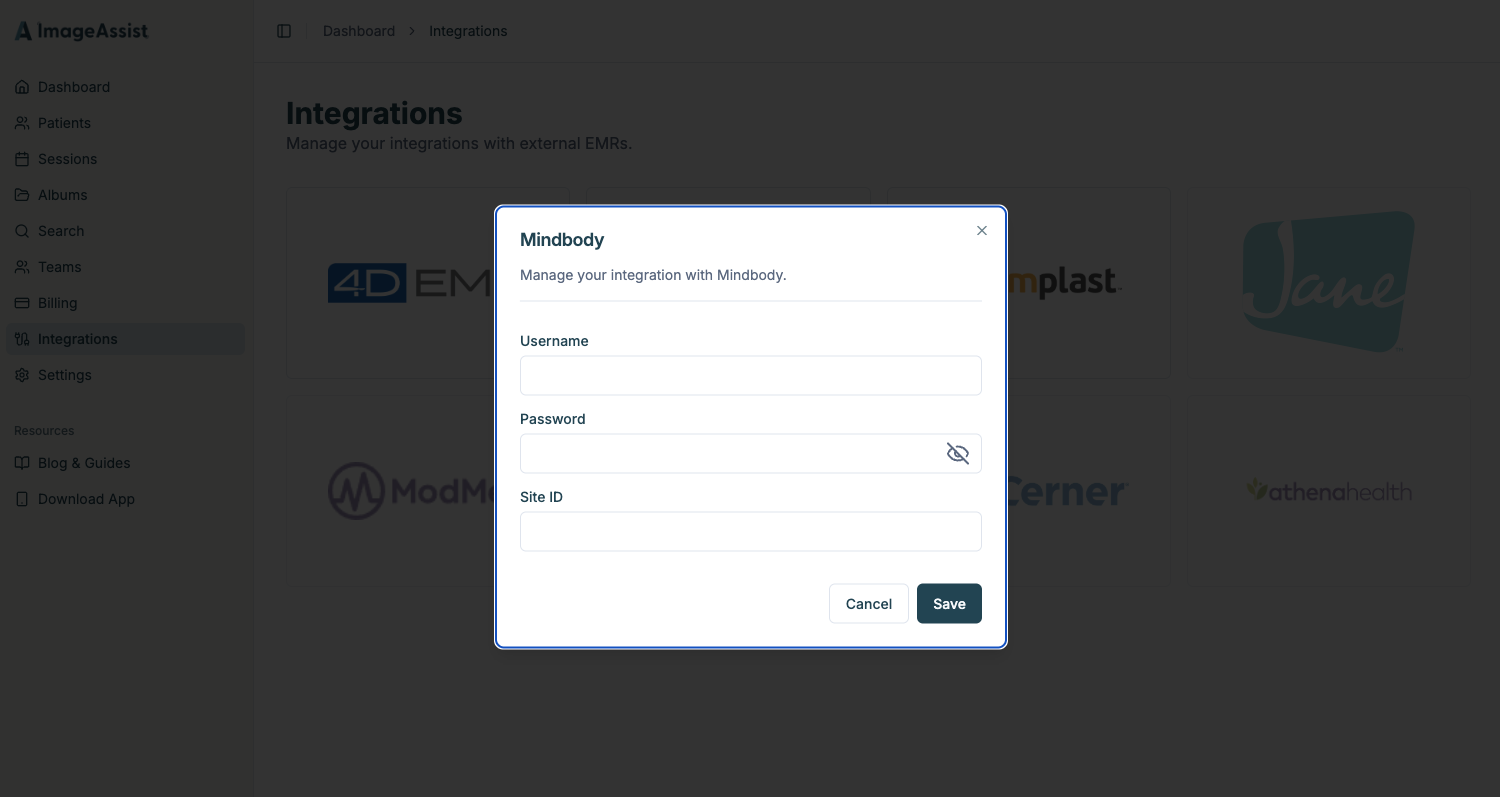
Step 3: Connect Mindbody
Choose Mindbody from the list of integrations and enter:
• Mindbody Username
• Mindbody Password
• Mindbody Account ID
Then click Save.
Your integration is now connected.
What Happens Next
Once the integration is active, your team can capture photos directly from the ImageAssist iOS app.
On iPhone or iPad:
• Client appointments from your Mindbody calendar will automatically appear in ImageAssist
• Staff can start a photo session directly from the client appointment
• Photos are automatically saved to both ImageAssist and the client's Mindbody record
This creates a seamless workflow for documenting client results.
A Better Workflow for Client Photography
ImageAssist helps fitness, beauty, and wellness brands bring structure and consistency to client photography.
Instead of managing photos across phones and folders, teams can capture standardized photos, organize results by client, and build a visual record of client progress.
We're excited to bring modern photography workflows to the Mindbody ecosystem and help practices elevate how they document results and engage with clients.
Learn More
If your practice uses Mindbody and wants to streamline how you capture and manage client photos, we’d love to show you how ImageAssist works.